Hallarskipan — Runavík sports halls
Sports hall time in Runavík made visible and bookable online, hall by hall, in 30-minute slots.
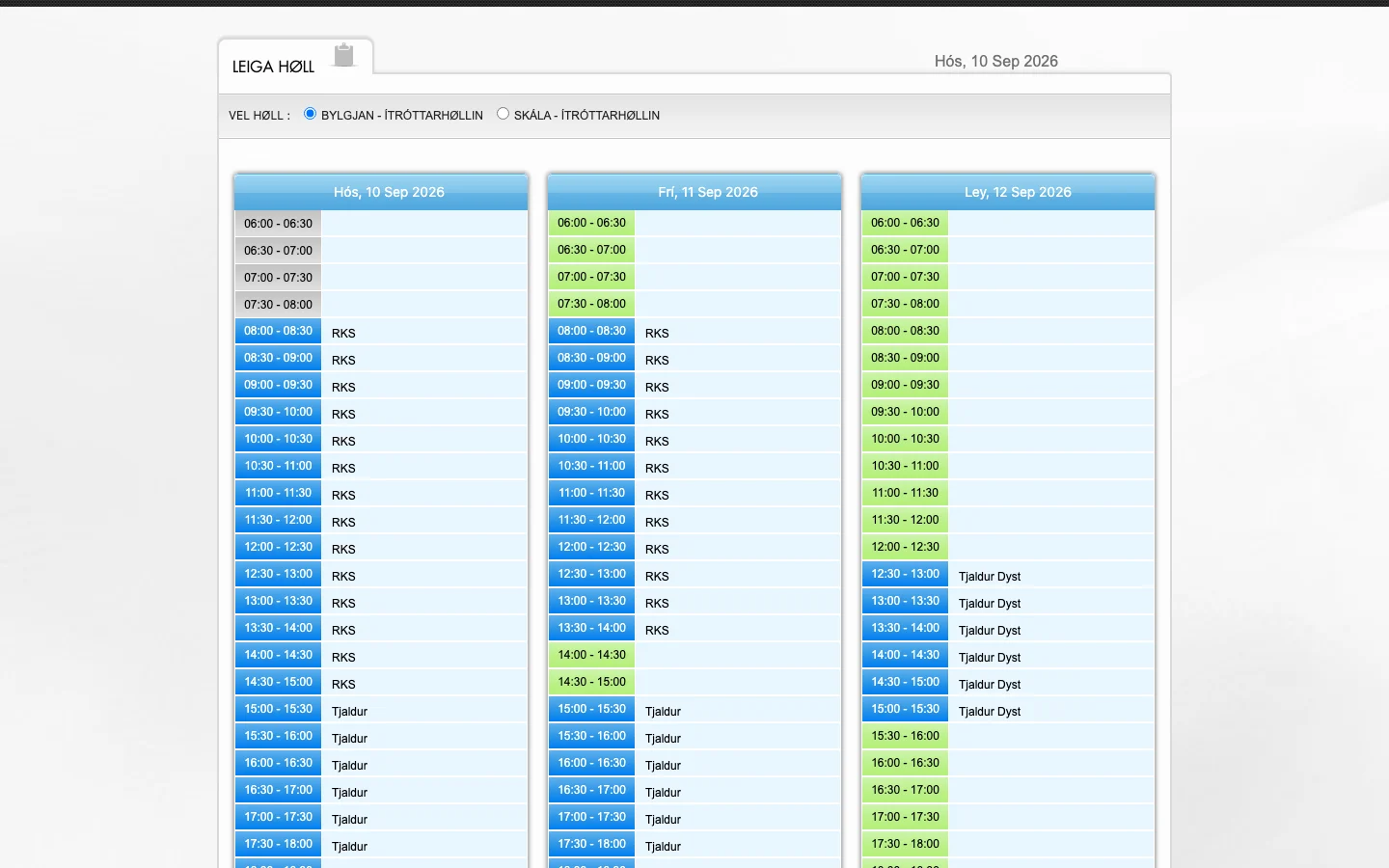
Hallarskipan is the public booking calendar for sports halls in Runavík, Faroe Islands. For each hall it shows the day in 30-minute slots from 06:00 to 23:00, colour-codes what is available, booked or reserved for events, and names the organisation, team or event that holds a booked slot. A visitor books a free slot with a name, phone number and email address; Dankort, Maestro, MasterCard, Visa and Visa Electron are offered for payment. The interface is in Faroese.
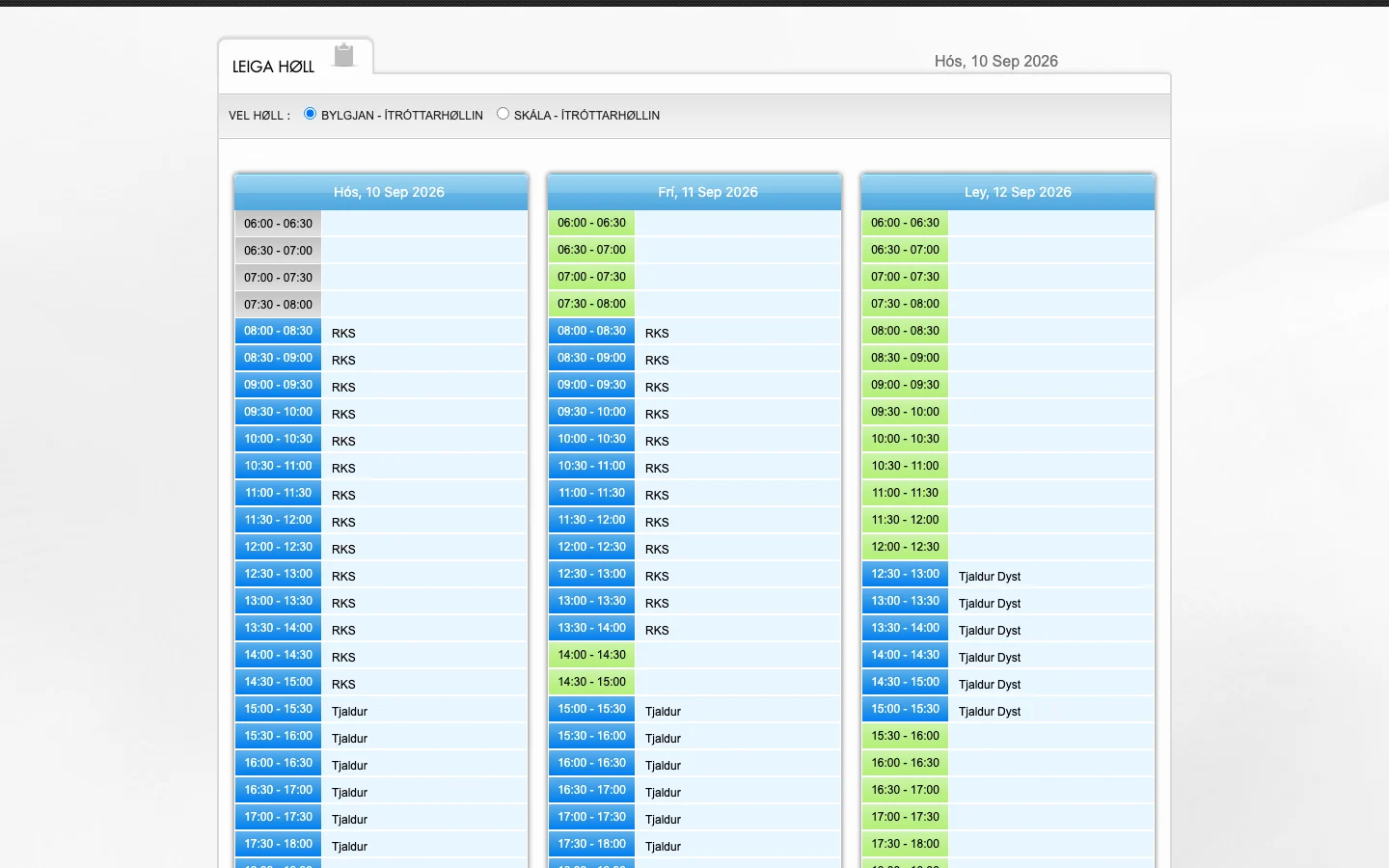
Project interface
- Client
- Hallarskipan — Runavík sports halls
- Project Type
- Public booking system for sports halls
- Industry
- Municipal & Sports Facilities
- Platform
- Public web booking calendar, Faroese
- Engagement
- Booking calendar, booking form and card payment step
- Status
- Live
Business Context
Shared halls, many users, and a timetable everyone has to be able to read.
Sports halls in Runavík are used by organisations, teams and events, and a hall's day is only as usable as its timetable is clear. Hallarskipan puts each hall's day online: for the halls on the calendar — Bylgjan and Skála — every 30-minute slot from 06:00 to 23:00 is shown with its state, and booked slots carry the name of the organisation, team or event that holds them.
A booking calendar for public facilities has three jobs: show availability plainly, take a booking from a member of the public with a minimum of detail, and take payment where a booking is paid for. Hallarskipan does all three from a single public page, in Faroese, with a short form — name, phone, email — and card payment by Dankort, Maestro, MasterCard, Visa or Visa Electron.
The Challenge
Show a hall's whole day at a glance, distinguish several kinds of booking, and take a public booking and payment from a short form.
01
A day in 30-minute slots
Each hall runs from 06:00 to 23:00 in 30-minute slots. The grid had to stay legible at that density on a page a visitor opens for a few seconds.
02
Several kinds of booking
The legend separates available (green), booked (red), booked as secondary (yellow), events and handball (blue) and time outside the bookable period (grey). Each state had to be recognisable without reading the legend.
03
Bookings by organisation, team and event
Booked slots carry the organisation, team or event that holds them, so the calendar doubles as the public timetable for each hall.
04
A short public booking form
A visitor books with a name, phone number and email address. The form had to be quick to complete and still give the hall enough to reach the booker.
05
Card payment in the flow
Dankort, Maestro, MasterCard, Visa and Visa Electron are presented with the booking, so payment had to sit inside the booking flow.
06
More than one hall, one address
Bylgjan and Skála are selected within the same interface, which runs at a Runavík-specific subdomain of hallir.com.
Requirements
What the live system visibly provides.
Requirements read from the public booking interface as it runs today: the halls, the slot grid, the legend, the booking form and the card payment methods offered.
Scheduling
- Day view per hall
- 30-minute slots from 06:00 to 23:00
- Navigation by date
- Time outside the bookable period shown as unavailable
Availability States
- Green: available
- Red: booked
- Yellow: booked (secondary)
- Blue: events and handball
- Grey: outside the bookable period
Bookings
- Booked slots labelled with the organisation, team or event
- Booking against a specific hall, date and slot
- Public booking form: name, phone, email
Payment
- Card payment methods presented with the booking
- Dankort, Maestro, MasterCard, Visa, Visa Electron
Access & Presentation
- Availability visible without signing in
- Hall selection: Bylgjan and Skála (Ítróttarhøllin)
- Faroese-language interface
KAPAT Approach
How KAPAT approached the work.
01
Define
Establish the halls, their bookable hours and periods, and the 30-minute slot grid the calendar has to present.
02
Model
Represent halls, dates, slots and booking states — available, booked, secondary, event — as data the calendar and the booking flow share.
03
Design
Lay out the day view so that a whole day reads at a glance, with a colour legend a first-time visitor understands.
04
Engineer
Build the calendar, the public booking form and the card payment step as one flow on a single page.
05
Verify
Check the slot grid, every legend state and the booking and payment flow for each hall before release.
What Was Engineered
What the live system provides.
01
Hall day view
A per-hall calendar of 30-minute slots from 06:00 to 23:00, navigated by date, with each slot showing its state.
02
Availability legend
Five states — available, booked, booked (secondary), events and handball, outside the bookable period — in green, red, yellow, blue and grey.
03
Booking labels
Booked slots display the organisation, team or event that holds them, making the calendar the public timetable for the hall.
04
Public booking form
A short form — name, phone number, email address — for booking a free slot directly from the calendar.
05
Card payment step
Dankort, Maestro, MasterCard, Visa and Visa Electron presented as payment methods with the booking.
06
Multi-hall selection
Bylgjan and Skála each available within the same interface, at a Runavík-specific address.
Interface
Selected interface views.
Verified screenshots only. Frames marked in preparation are replaced as screenshots are approved for publication.
What KAPAT Handled
KAPAT's contribution.
Outcome
Outcome statements are published only once verified with the client. Detailed engineering documentation for this project is being prepared for publication.
Related solutions and services
Related Solutions
Work
Need a system built with this level of care?
Start with the business problem. KAPAT will define the architecture, the scope and the engineering approach with you.
A direct conversation with the engineers who would build the system — no sales layer in between.
View Services